@wazoo/sparql-engine — Code Wiki
Developer documentation for the Wazoo SPARQL 1.1 & 1.2 query and update engine over RDF/JS Quad Stores. This wiki is an application-first tour of the engine: how queries are parsed, optimized, and evaluated; the public API contracts; the physical source map; and how to test and benchmark the engine.
The content is verified against the codebase and the deno doc --json symbol
inventory of the public surface (src/mod.ts). Every file path below is
relative to the repository root.
Pages
| Page | What it covers |
|---|---|
| 01 — Developer Quickstart | Setup, install, running queries, test suites, CI tasks |
| 02 — Architecture & Pipeline | Query lifecycle, algebra, joins, memory model, stores |
| 03 — API Contracts | SparqlEngineInterface, request/response envelopes, |
| feature matrix, extensibility seams | |
| 04 — Source Map | Directory walkthrough, file → symbol → doc mapping |
| 05 — Verification & Testing | Unit/parity/W3C suites, benchmarking, debugging |
| 06 — Supplemental Context | Datasets, W3C suite notes, divergences, metadata |
| 08 — Wiki Maintenance | The sync procedure: keep this wiki truthful to main |
Related in-repo documents:
ARCHITECTURE.md
(topology and @worlds/sdk relationship),
CONTEXT.md
(glossary), and docs/durable-transactions.md
(durable SQLite backend — the store moved to @worlds/sqlite, pointer kept).
One-paragraph map
SPARQL string
   │  WazooSparqlEngine.execute()            src/wazoo-sparql-engine.ts
   ▼
SparqlParser.parse()                         src/parser/sparql-parser.ts
   │  sparqljs-compatible AST                src/parser/ast.ts
   ▼
SparqlEvaluator.evaluateQuery()              src/evaluator/sparql-evaluator.ts
   │  BgpEvaluator (pattern algebra)         src/evaluator/bgp-evaluator.ts
   │  join.ts (hash joins, property paths)   src/evaluator/join.ts
   │  select-pipeline.ts (group/order/etc.)  src/evaluator/select-pipeline.ts
   ▼
rdfjs.Store (MemoryStore, any external)  src/store/, src/quad-store.ts
Updates take a parallel path through UpdateEvaluator.executeUpdate()
(src/evaluator/update-evaluator.ts) with optional atomic transactions.
Footprint at a glance
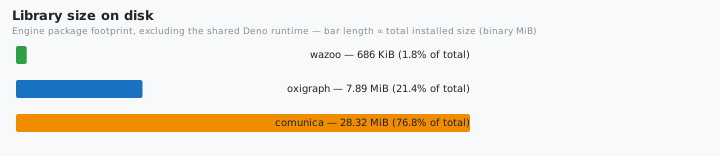
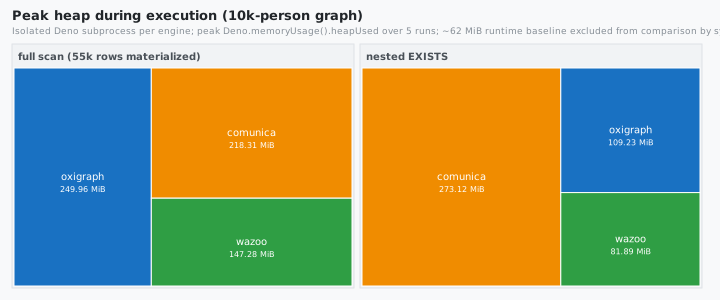
The charts below summarize what the engine costs to ship and run versus the
reference engines. The numbers they plot live in the root README.md
(regenerated from bench/*-data.json); the methodology is on
07 — Benchmarking & Performance:
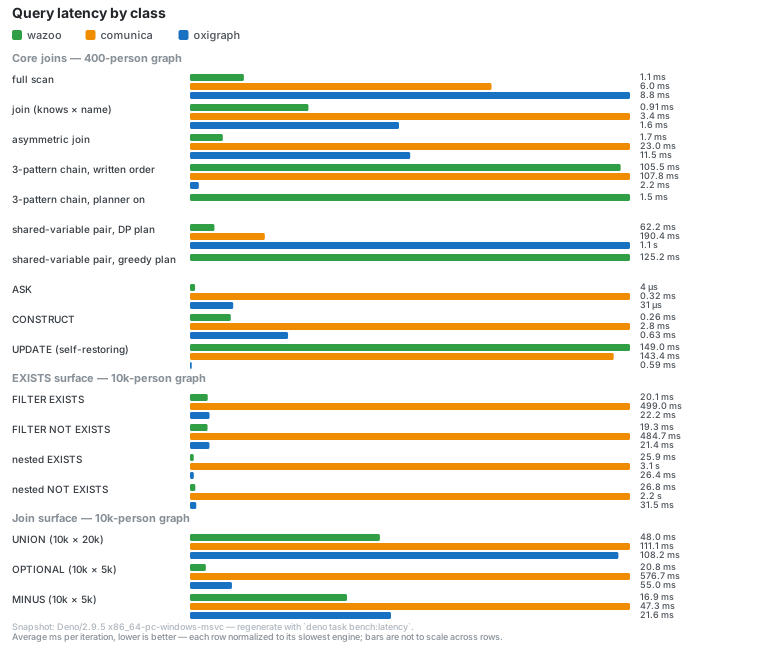
Latency — average per-query-class latency, lower is better; the committed
chart (full methodology in
07 — Benchmarking & Performance, numbers in the root
README.md):
Keeping this wiki in sync
docs/ is maintained by a Git-anchored delta process (the approach
LangChain’s OpenWiki uses): docs/.sync-base records the last-synced commit,
and syncing means diffing origin/main forward from that anchor and editing
only the affected pages — never regenerating. The procedure — structure verified
from git ls-tree and deno doc --json; this wiki uses the drift-free
detail_level: minimal style, so no line numbers or counts — is codified in the
wiki skill’s sync reference and documented on
08 — Wiki Maintenance. If you land a source change, sync
the wiki the same way — it is a command, not a prompt.
GitHub Pages setup
The docs/ directory is the GitHub Pages content root. To publish:
- Repo Settings → Pages.
- Source: Deploy from a branch.
- Branch:
main, folder:/docs. - Save. GitHub Pages builds the markdown with Jekyll; this
README.mdis the landing page and the0X-*.mdpages are linked from it.
No workflow file is required for this mode. (The alternative — the
actions/deploy-pages workflow — also works; point its artifact at docs/.)
Pages picks up changes on every push to main.